Showing posts with label Technology. Show all posts

Wednesday, December 13, 2006

Watch NFL Network For Free


Editor's note: Click here for a quick recap of the controversy between the NFL Network and the cable companies.

The NFL has offered New York-area cable companies seven days of free access to the NFL Network during the last week of the year. This isn't an unusual move by Roger Goodell and company. Networks like HBO ocassionally provide free access in an effort to gain viewers. It's a moneymaking play for networks, because customers who watch the premium content during the free period are more likely to pay for it when the trial run is over.

Make no mistake, the NFL is not acting altruistically here. By making this offer to Cablevision and Time Warner Cable, the NFL Network gets the New York viewers it's been missing, and it gets to associate itself with the word "free" in the public eye. More importantly, the free access period happens to include December 28, the date of the Texas Bowl between Rutgers and Kansas State. The Royal We noted that the NFL Network owns the right to broadcast this game, so by allowing viewers in New York and New Jersey to watch for free, the NFL avoids an intervention from Garden State politicians, who might have otherwised forced the NFL to lower its per-subscriber asking price in order to get Rutgers on the air.

Cablevision realizes all of the above, and has already announced that it has accepted the NFL's generous offer to show the Rutgers bowl game. Left unsaid? Cablevision will not be showing any other NFL Network programming during the free week. It seems like a neat slap in the face to the NFL, which wouldn't generate NY/NJ ratings for its signature content (NFL games). However, it's mostly an empty gesture because the Giants-Redskins game that Saturday night (scheduled for the NFL Network) will be broadcast on over-the-air television in those teams' local market for all to see, as required by law. In other words, New York viewers get the Giants game anyway, probably on channel 11 or channel 9.


Both the NFL and the cable companies continue to screw over their customers. Neither side deserves our support. And as a public service, here's an end run around them both. It's called Sopcast. Download the free software at Sopcast.org, then click over to a blog called Streaming NFL Games, where they'll tell you the code to enter into your Sopcast window to pick up the live feed of the NFL Network, with no commercials!

Enjoy, from your friends at Get Untracked.

Tuesday, November 21, 2006

Football Field as Jumbotron

What if the yellow first down line you see when you watch a football game on television was visible from your seat in the stands? The official turf provider to the Arena Football League (and provider of turf to two NFL teams) is called Sportexe, and they've got a patent that proposes to do that and more.

Forbes reported on the company, which is 40%-owned by Ravens owner Art Modell. Like the other major turf company, FieldTurf, Sportexe installs artificial surfaces made up of millions of individual blades of plastic grass, with rubber pellets underneath to simulate dirt. The patented technology places fiber optics inside each blade of grass. Each blade acts like a pixel in a computer monitor, working together to produce a larger image.

The first-down line on NFL broadcasts is really helpful for viewers, but I'm not enamored with graphics that literally create a "red zone" when the offense drives to the 20. And do we really need an on-field graphic that explains a kicker's accuracy from a certain distance - right as the kicker steps into the ball? The least appealing aspect of the new technology is the certainty that it will be used to run advertisements on the field itself, perhaps even between plays.

I'm all for the onward march of progress, but am often disappointed by the way broadcasters choose to use it. (Who's this week's White Castle Steamer of the Week? Text your vote to 86648 right now!!!) At least everybody attending the Super Bowl wouldn't have to worry about DVR-ing the commericals.

Monday, November 20, 2006

The Get Untracked Guide To Buying An HDTV For The Playoffs

Last week, BDD @ KSK wrote "We're in mid-November now. The heart of the football season." His look at preparing for the playoffs was a bit different than what follows, but it inspired me to provide a guide on a subject I know a little bit about: High-Definition Television.

I was lucky enough to win a 26" LCD in a contest last July. That screen was good enough to show the quality difference between regular and HD programing, which must be seen to be appreciated. But I've been researching current models so I could upgrade to something I wouldn't need lasik to view from nine feet away. If you're still without an HD set, even if you own the 35" Sony Wega that was all the rage two years ago, it's time to get primed for the playoff run.

As with most things in life, so it is with buying an HDTV. There are two types of people: People who want a television that will last them the next ten years no matter the cost today, and people who want an HD set that's perfectly fine for now without breaking the bank. Let's break it down.

The future-proof HDTV: Sharp Aquos LC-52D62U - LCD ($3,200)
This is the sixth generation of Sharp's bestselling LCD panel, and the best choice for someone looking to buy an HDTV today. The screen size is huge, especially for an LCD. Historically, LCD manufacturers had trouble selling such a large display at a reasonable cost. A year ago, Sharp was selling its 65-inch LCD for $20,000. I'm sure you've seen ads for larger HDTVs, but most of those are "DLP" TVs, which are not flat panels like LCDs or plasmas; DLPs weigh twice as much and are more than twice as thick. That means you can't hang a DLP on the wall. The elegance of a beautiful HDTV hanging on the wall is a key selling point you can use on your wife or girlfriend. One estimate shows women driving flat screen purchases over DLPs about 60% of the time, so if you've got a lady in your life, a flat screen is the way to go.

Aside from the large screen, the technical specs of this LCD put it far and above anything else on the market at this price. This LCD has true 1080p. That number refers to the resolution on the screen and measures the pixel count of the display. You've been able to buy an HDTV with enough pixels to display 1080p for over a year, but HDTVs sold before... well... pretty much now, couldn't accept a 1080p input. This Aquos does accept 1080p, which means that a few years from now, when you have a bunch of HD-DVDs or Blu-Ray discs (e.g., Playstation 3), and when all HD content is broadcast in 1080p, your HDTV won't already be outdated.

Two more reasons this screen is so great... Its contrast ratio of 10,000:1 (basically, how dark it displays the color black; most LCDs can only get to dark gray) and its screen refresh rate of 4ms (how well it displays fast-moving action like sports). Compare those specs to other LCDs and you'll see why, if you've got the free cash to spend, the Sharp Aquos LC-52D62U is just about perfect.

Honorable Mention: Sony Bravia KDL-52XBR2 ($5,500)
This Sony gives you the same ability as the Aquos to accept true 1080p inputs, the same screen size, and a slightly inferior contrast ratio and refresh rate. The price premium gets you a beautiful glass bezel around the screen and BRAVIA Engine PRO image processing. Image processing is the method by which your rectangular HDTV makes square pictures look good, and it's useful for people who watch a lot of regular-definition programming or standard DVDs. But in five years the importance of image processing will be diminished because so little programming will be shown in a format other than 1080p. If money is no object, the Sony is the better HDTV, but the Aquos' value gives it the edge in this comparison.


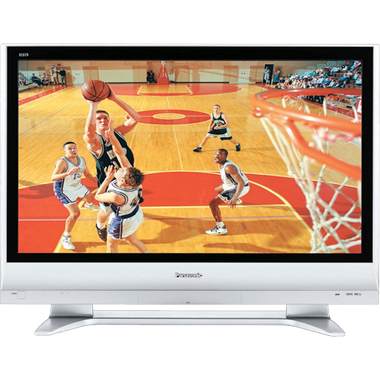
The HDTV to enjoy without breaking the bank: Panasonic TH-42PX60U - Plasma ($1,300)

After all that talk about accepting 1080p inputs and viewing 1920 x 1080 pixels, why would I recommend a screen that can only display up to 720p (1366 x 768)? Because sports are broadcast today in either 720p - on ESPN/ABC and Fox - or in 1080i on CBS and NBC. Right now the only 1080p content available comes from new high-definition DVDs and the Playstation 3. If you don't have either of those, you can get by with a 720p tv for at least a couple more years. In fact, Fox claims that 720p is better than 1080i (not 1080p, mind you) for viewing sports.

Because the Panasonic is a plasma not an LCD, a 10,000:1 contrast ratio is to be expected; the color black looks great on this screen. A plasma is thin like an LCD, so you can hang it on the wall. The drawback to plasma, that an image can "burn in" to the screen, is something you should be aware of, but if you're careful, this plasma will give you a much better picture than comparably-priced LCD tvs.

As Drew wrote: "You have your marching orders." Now, just don't fall for the extended warranty!